All About Android

Showing posts with label easily. Show all posts

Sunday, November 30, 2014

How to Root and install custom recovery on OnePlus One

with 0 Comment


OnePlus One is the flagship killer device at a price of mid ranger it is surely a value for money for every buyer. But the power users crave much more than a perfect phone...


The post How to Root and install custom recovery on OnePlus One appeared first on Phone Horn.


via Phone Horn http://www.phonehorn.com/2014/11/root-install-custom-recovery-oneplus-one/

Sunday, November 23, 2014

How to Root and Unroot Xiaomi Redmi Note easily

with 0 Comment


Xiaomi is going global with release of devices outside of China and now Xiaomi Redmi Note is crossing boundaries and it features an Octa-Core CPU, 13-megapixels camera, 5.5″ HD Display along with 5-megapixels front...


The post How to Root and Unroot Xiaomi Redmi Note easily appeared first on Phone Horn.


via Phone Horn http://ift.tt/1ur6XFT

Sunday, June 29, 2014

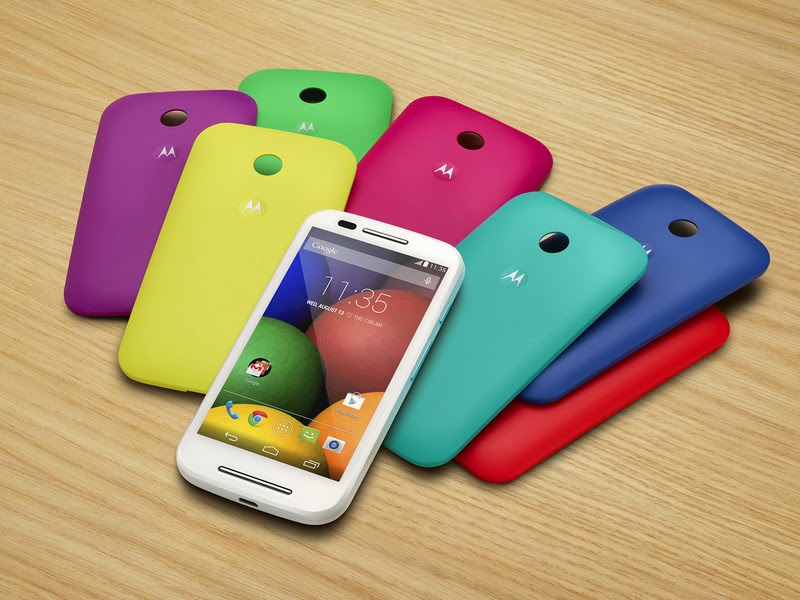
How to root Moto E Quick and Easy

with 0 Comment
Moto E is beautiful device with low price and decent specification is one of the hottest selling smartphones in market and to make this awesome phone more cool we bring to you how to root your Moto E

Things Required

Important Note: Unlocking bootloader will wipe your device so make sure to Backup everything from Music, Contacts, Apps and Everything
Steps to Unlock Bootloader

  • Download all the files from above thing required column.
  • Put your Moto E in Fastboot Mode by turning off and then holding Volume Down + Power Button
  • Go to the folder in which you extracted  Fastboot Tools and hold Shift Key and then press Mouse Right button and select Open Command Window Here.
  • Type or Copy Paste fastboot oem get_unlock_data
  • You will get some string see this image. 
  • Paste together the 5 lines of output into one continuous string without (bootloader) or ‘INFO’ or white spaces to the 6th Point in Moto Bootloader Unlock WebsitYour string needs to look like this: 0A40040192024205#4C4D355631323030373731363031303332323239#BD008A672BA4746C2CE02328A2AC0C39F951A3E5#1F532800020000000000000000000000
  • Click I agree and get Unlock Code in your email which you used to login.
  • Then at last type fastboot oem unlock Unlock Key the Unlock Key underlined is your key you received through email.
Congratulation now your bootloader is unlocked
Now Rooting Phone is very easy.

Steps to Root Your Phone
  • Rename downloaded Recovery to recovery-twrp.img and copy to Fastboot Tools Folder
  • Copy SuperSU.zip to your phone storage 
  • Reboot to fastboot mode using Volume Down and Power button
  • Type the command fastboot flash recovery recovery-twrp.img
  • Now Type  fastboot boot recovery-twrp.img
  • Select Install and scroll and select SuperSU.zip and Swipe to confirm install.
  • After it reboot and Now you have rooted your Moto E succesfully.

Wednesday, January 22, 2014

Root and Un-Root Samsung Galaxy Core I8262 Quickly and Easily without PC

with 1 comment
Samsung Galaxy Core I8262 is a dual sim android smartphone which comes with a 4.3" display, 1.2GHz dual-core CPU and 5 megapixel primary camera. Today we will root it in five quick steps without loosing warranty.

Requirements

  • Samsung Galaxy Core I8260/I8262
  • Framroot.apk
  • A bit of time and patience
Steps to root
  • Open Settings>Security> Check Unknown sources Box
  • Download & Install the framroot.apk on your Samsung Galaxy Core I8260/I8262
  • Open the app and Pick SuperSu from dropdown list.
  • Click On Legolas or Aragorn Button.
  • Now sitback for 10mins
  • You are now rooted
Note : After taping 
Legolas or Aragorn
 button your device may restart for few time, don’t panic wait until it completes.

Steps to Unroot
  • Open SuperSu app
  • Goto Setting of supersu  app and scroll down and click on un-root device.

Sunday, January 19, 2014

How To Root Micromax Canvas Juice A77 Quick and Easily without PC

with 0 Comment
Micromax Canvas Juice A77 has a 5MP camera on the back and a VGA camera in front. Connectivity suite of the phone consists of 2G, 3G, Wi-Fi, Bluetooth and microUSB. It has a 3,000mAh battery that offers talk time of up to 10 hours.

So lets root our Micromax Canvas Juice A77

Requirements

  • Micromax Canvas Juice A77
  • Framroot.apk
  • A bit of time and patience


Steps to root
  1. Open Settings>Security> Check Unknown sources Box
  2. Download & Install the framroot.apk on your Micromax Canvas Juice A77.
  3. Open the app and Pick SuperSu from dropdown list.
  4. Click On Boromir Button.
  5. Now sitback for 10mins
  6. You are now rooted
Note : After taping Boromir button your device may restart for few time, don’t panic wait until it completes.

Steps to Unroot
  1. Open SuperSu app
  2. Goto Setting of supersu  app and scroll down and click on un-root device.

How To Root Micromax Canvas XL A119 Quick and Easily without PC

with 0 Comment
Micromax Canvas XL has a 6"inch display with qHD resolution and it also has 1.3Ghz quad core processor, 1GB Ram, 4GB internal memory, 32GB external via card, GPS, Wifi, Dual Sim and Bluetooth. It runs on Android 4.2 and has a 2450mAH battery. Micromax Canvas XL also has a 8MP primary Camera and 5MP secondary camera.
So lets root our Micromax Canvas XL A119
Requirements

  • Micromax Canvas XL A119
  • Framroot.apk
  • A bit of time and patience


Steps to root
  1. Open Settings>Security> Check Unknown sources Box
  2. Download & Install the framroot.apk on your Micromax Canvas XL A119.
  3. Open the app and Pick SuperSu from dropdown list.
  4. Click On Boromir Button.
  5. Now sitback for 10mins
  6. You are now rooted
Note : After taping Boromir button your device may restart for few time, don't panic wait until it completes.

Steps to Unroot
  1. Open SuperSu app
  2. Goto Setting of supersu  app and scroll down and click on un-root device.

Saturday, January 18, 2014

How To Root Micromax Canvas A114 Quick and Easily without PC

with 0 Comment
Micromax Canvas 2.2 is one of the sleekest Micromax smartphone and it runs on android 4.2.2 and has a 1.3GHz quad core processor. Micromax Canvas 2.2 can be rooted easily with boromir exploit. Below are detailed instruction on how to root Micromax Canvas 2.2 A114.

Requirements

  • Micromax Canvas 2.2 A114
  • Framroot.apk
  • A bit of time and patience


Steps to root
  1. Open Settings>Security> Check Unknown sources Box
  2. Download & Install the framroot.apk on your Micromax Canvas Magnus A114.
  3. Open the app and Pick SuperSu from dropdown list.
  4. Click On Boromir Button.
  5. Now sitback for 10mins
  6. You are now rooted
Note : After taping Boromir button your device may restart for few time, don’t panic wait until it completes.

Steps to Unroot
  1. Open SuperSu app
  2. Goto Setting of supersu  app and scroll down and click on un-root device.

Wednesday, January 15, 2014

How to Root Your Sony Xperia C [C2305] QUICK AND EASY

with 48 comments
Xperia C
Sony Xperia C is one of the hottest selling phone under Rs 20,000 and has got some decent specification. It features a 5"inch qHD capacitive display, 1.2GHz quad core CPU alont with 1GB RAM, 4GB internal Memory and Dual Sim. With Sony design we get a complete package that is selling like hotcakes.

Monday, January 13, 2014

HOW TO ROOT YOUR Micromax Canvas Magnus A117 without pc QUICK AND EASY

with 0 Comment
Earlier today we reported that Micromax Canvas Magnus A117 was available at a discounted price. Now we bring to you a simple and easy method to root your Micromax Canvas Magnus A117.

Requiremenrs

  • Micromax Canvas Magnus A117
  • Framroot.apk
  • A bit of time and patience


Steps to root
  1. Open Settings>Security> Check Unknoen sources Box
  2. Download & Install the framroot.apk on your Micromax Cnnvas Magnus A117.
  3. Open the app and Pick SuperSu from dropdown list.
  4. Click On Boromir Buttom.
  5. Now sitback for 10mins
  6. You are now rooted
Note : After taping Boromir button your device may restart for few time, don’t panic wait until it completes.

Steps to Unroot
  1. Open SuperSu app
  2. Goto Setting of supersu  app and scroll down and click on unroot device.


Sunday, January 12, 2014

HOW TO ROOT YOUR SAMSUNG GALAXY S DUOS 2 (GT-S7582) QUICK AND EASY

with 41 comments
LET ME SHOW YOU HOW TO ROOT YOUR SAMSUNG GALAXY S DUOS 2 S7582 EASILY AND QUICKLY IN FEW EASY STEPS


THINGS REQUIRED:

  • SAMSUNG GALAXY S DUOS 2 GT-S7582
  • A WINDOWS PC
  • SOFTWARE AND Prerooted rom file
  • DATA CABLE
  • A BIT OF TIME AND PATIENCE

Downloads

STEP 1

Extract  PRE ROOTED ROM

Step 2

turn off your samsung galaxy s duos 2 and restart in download button by holding volume down+home key+ power key TOGETHER

STEP 3

When you see a warning screen press volume up key

Step 4

open odin 3 you extracted from prerooted rom folder and connect your phone with data cable

step 5


if your device is SHOWN in id:com box click on pda button and select the file extracted in step 5 its name must be pre_rooted_gt_s7582.tar

Step 6


Click STart and let the magic begin. after you see a green pass button you can unplug device.

WARNING AND TROUBLESHOOT

ALL DATA WILL BE LOST
WARRANTY IS NOW VOID
IF your device is not recognised try unistalling drivers from device manager and then reinstall drivers and reboot the pc
in case of any trouble leave a blog comment or contact vivek23994@gmail.com or @nomatchoftome on twitter

Credits

androidxda.com for all the download files


Thursday, January 9, 2014

How to Root Your Samsung Galaxy Grand Duos (GT-I9082) Quick and Easy

with 0 Comment

Let me show you how to root your Samsung Galaxy Grand Duos I9082 easily and quickly in few easy steps

Things required:

  1. Samsung Galaxy Grand Duos I9082(50% at least)
  2. A windows pc
  3. Software and Cwm file
  4. Data cable
  5. A bit of time and patience

Wednesday, January 8, 2014

How to Root Your Samsung Galaxy Note III 3 (SM N9000)(Exynos)(International)(All) Quick and Easy

with 1 comment

Let me show you how to root your Samsung Galaxy Note 3 easily and quickly in few easy steps


Things required:

  1. Samsung Galaxy Note 3
  2. A windows pc
  3. Software and CWM file
  4. Data cable
  5. A bit of time and patience

Monday, January 6, 2014

[Guide] How to Root & UnRoot Micromax Canvas Turbo A250 No PC required Easily

with 0 Comment

Requirements to Root Micromax A250

1) Backup : Make sure to backup all the important things like sms, contacts, call logs etc from phone to SD card or any safe place.
2) Download the Framaroot app from here.
Follow bellow instruction…

How To Network Unlock Samsung Galaxy S4 I9505 on android 4.3

with 2 comments
This will require use of odin so warranty may be deemed void by samsung

IMPORTANT NOTE GOTO Setting>About Phone and note the firmware

Step 1: Download  and extract these files i9505-Unlock.zip
Step 2: Run odin and click PDA and select I9505-Unlock-4.2.2.tar
Step 3: power off your phone and disconnect it from the cable then press volume down + home + power same time
Step 4: Connect Phone with pc and you can see a yellow color bar with COM listed.
Step 5: Press start and wait for phone to restart.
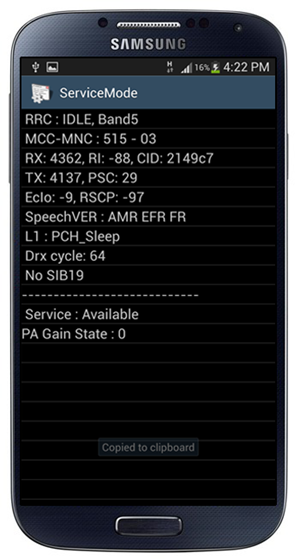
Step 6: Launch the Phone app on your Galaxy S4, and dial in: *#0011#
Step 7: Press the Menu button followed by the Back key. Then, hit the Menu button again and select KEY INPUT. Enter 1 and press the OK button to enter ServiceMode.

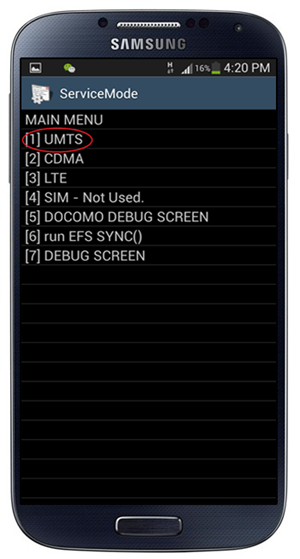
Step 8: Press Menu one more time and tap back again. This will pull up the Main Menu for ServiceMode. Tap [1] UMTS

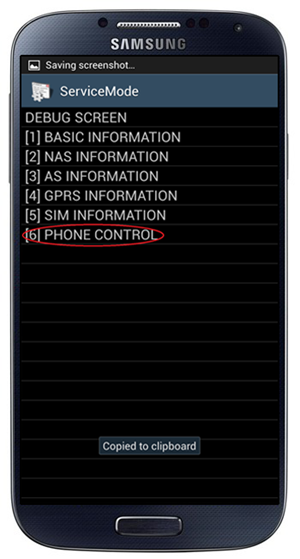
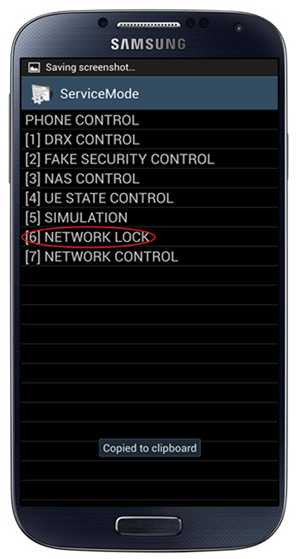
Step 9: Now select [1]DEBUG SCREEN, followed by [6] PHONE CONTROL.

Step 10: From the next screen, pick [6] NETWORK LOCK.

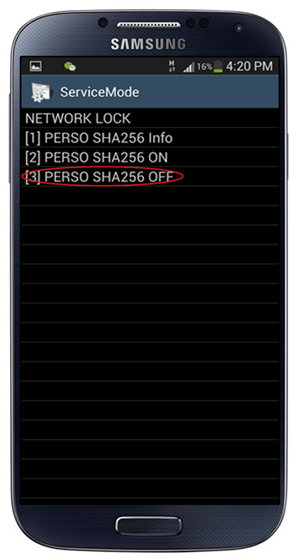
Step 11: You’ll get three options. Hit the one that says [3] PERSO SHA256 OFF.

Step 12: Now, you need to get back to Main Menu. To do this, hit the Menu button followed by the Back key. In Main Menu, now pick [6]COMMON, and then [6] NV REBUILD.

Step 13: The phone will tell you that a Golden Backup exists. Tap [4] Restore Back-up.

Now switch off phone insert sim and check if it doesn't ask for code on start hurray 80% work is over

Now Goto http://forum.xda-developers.com/showthread.php?t=2192025 and Select the appropriate odin flashable modem for your S4 model and Firmware version.

Again use Odin to flash the new modem back to phone.

Now you have network unlocked S4 enjoy it with any carrier you want